
Track-It Hurricane Tracker
Down South CustomsWeather
4.6228.00 Reviews
- Version
- 7.1.05
- Installs
- 50.00K
- Age Rating
- Everyone
Screenshots
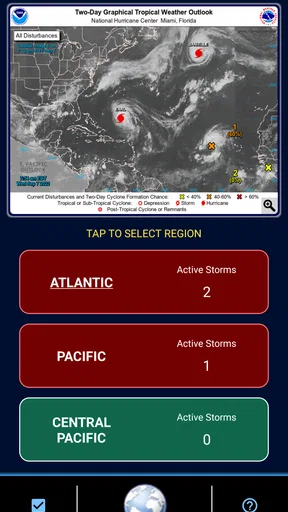
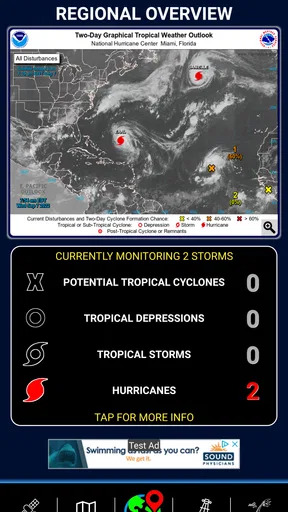
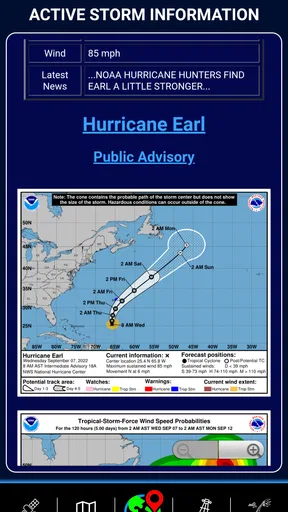
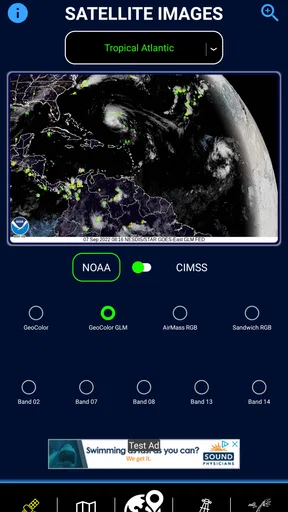
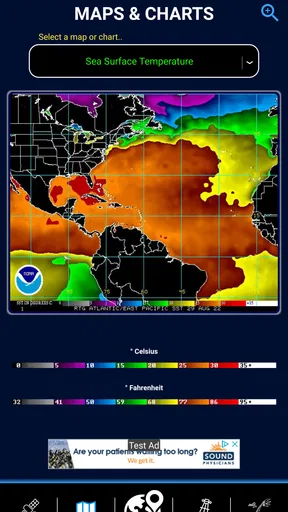
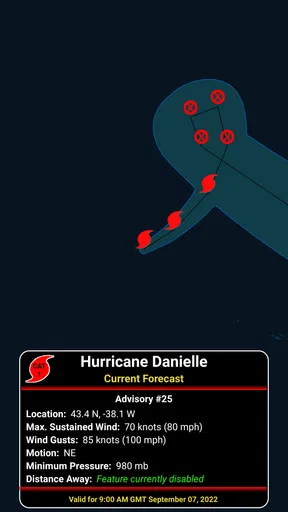
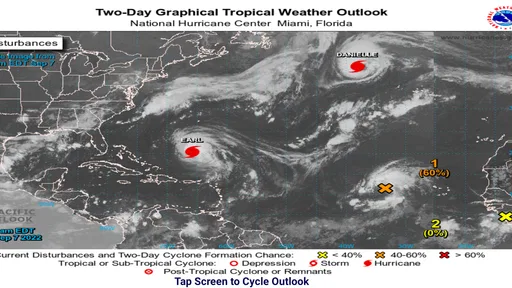
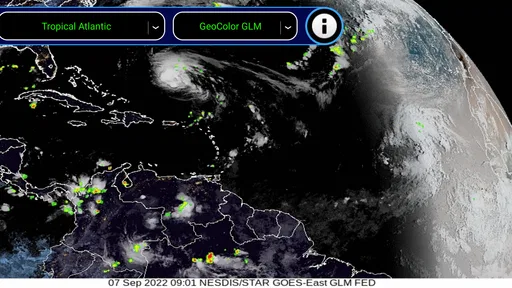
Our Review of Track-It Hurricane Tracker
 Analysis by Appyee
When a storm is moving toward the coast, I do not want a weather app that makes me dig through a crowded forecast screen before showing me what matters. Track-It Hurricane Tracker takes a more focused approach. It is a free weather app from Down South Customs built around hurricane tracking, and its appeal is easy to understand: it puts storm awareness at the center instead of treating it as just one small part of a general forecast service.
After spending time with it, I see the app as a practical companion for people who regularly follow tropical weather, live in an exposed area, or want a simpler way to keep an eye on developing systems. Its average rating of 4.6 from roughly 560 ratings and more than 200 written reviews suggests that many users appreciate that focused purpose. It has also passed the 50,000-install mark, which gives it a meaningful user base without making it feel like an oversized platform trying to do everything.
The most important thing to understand is that this is not trying to replace every weather tool on your phone. It is better viewed as a dedicated hurricane-tracking layer. That distinction affects how I would use it, what I would expect from it, and when I would still open a broader weather service or check official emergency information.
How the app feels when the network matters
I find that a hurricane tracker’s usefulness depends on more than what appears on screen; it also depends on whether I can reach it when conditions are changing. This section looks at how I would plan around that connection and distinguish a useful check from a stale one, before turning to the app’s place in ordinary mobile routines.
A focused view during an active storm
The usefulness of a hurricane tracker depends heavily on timely information. Storm positions, projected movement, warnings, and related details are not static facts, so the app becomes most valuable when it can connect and refresh the information you are following. I found that this creates a very particular rhythm: open the app, check the current picture, look for meaningful changes, and then close it rather than leaving it open constantly.
That workflow suits a storm situation better than endlessly scrolling through general weather content. A broad weather app may show hourly temperatures, rain chances, radar, air quality, and local conditions first. Those tools are excellent for ordinary days, but during tropical weather they can bury the question I actually care about: where is the system going, and how might that affect my area? Track-It keeps the subject narrower.
Its store summary describes it as a simple hurricane-tracking app with plenty of safety-oriented features. In practice, I read “simple” as a benefit for quick checks, not as a promise that every situation will be explained in depth. The app is useful for maintaining awareness, but I would not treat a single screen or single update as a complete emergency briefing.
Connectivity changes the quality of the check
Because a tracker relies on current weather information, a weak connection can make the experience less reassuring. If I were checking it from home on a stable connection, I would expect the app to be most comfortable to use. If I were traveling, inside a large building, or dealing with overloaded mobile networks during a serious weather event, I would be more cautious about assuming that the information on screen is current until it refreshes successfully.
This is one of the app’s central trade-offs. A dedicated tracker can make storm information easier to find, but it cannot remove the real-world dependence on communication networks and updated weather sources. I would use it as one part of a wider routine: check the tracker, pay attention to official alerts, and keep important safety instructions available through another reliable channel.
A useful habit is to open the app before leaving a dependable connection. I would review the latest storm picture, note any important changes, and avoid waiting until I am already driving or standing somewhere with poor reception. That small change in routine makes the app more useful without pretending that connectivity problems do not exist.
What happens when information changes quickly
Hurricanes are not ordinary rain showers. A system can change direction, strengthen, weaken, or affect different communities in very different ways. That means the app is most helpful when I use it to notice trends rather than to make a one-time judgment. I would compare successive checks and pay attention to whether the situation is moving closer, becoming more organized, or producing new concerns for my location.
There is also a human limitation here. A map or tracking display can feel precise even when the future path is uncertain. I would resist reading the projected route as a guarantee. The practical value is in seeing the developing situation and deciding when to consult local authorities, not in treating the line on a screen as permission to ignore changing advice.
Using Track-It in everyday mobile situations
I would use the app differently at home, at work, and while traveling, because each setting changes how much attention and reliable access I can give a storm update. The next section considers practical habits for fitting a quick check into those moments without letting the phone distract from safer decisions.
A realistic morning before travel
Imagine I am planning to drive along the coast while a tropical system is being monitored. Before leaving, I would use Track-It to get a quick overview of the storm, then check local forecasts and official notices for the places along my route. If the app shows that the system is shifting toward the area, that is a reason to reconsider the trip and investigate further, not a reason to continue simply because my current street looks calm.
That is where the app fits naturally into daily life. It can serve as an early awareness tool before work, school, travel, or errands. The advantage is speed: I can go directly to hurricane information instead of customizing a general weather app every time a storm appears. The limitation is that a hurricane overview does not automatically answer every local question, such as whether a particular road is open or whether a nearby neighborhood has an evacuation order.
Checking from home, work, and on the move
At home, I would use it as part of a short morning and evening check during an active weather threat. At work, I would prefer a quick glance rather than leaving the app running and repeatedly refreshing. On the move, I would check it only when safely stopped. A storm tracker is not valuable enough to justify handling a phone while driving, especially when the information should influence planning rather than split-second steering decisions.
The small-screen experience also changes how much detail I want at one time. A compact summary is easier to understand when I am in a hurry, while a more detailed examination is better done when I have time to read carefully. I would avoid making evacuation or shelter decisions while rushing through a crowded screen. The app can start the process, but important decisions deserve a calmer review of local guidance.
Who benefits most from the focused design
I think the strongest audience is someone who wants a dedicated hurricane tool instead of a general-purpose forecast app. Residents in hurricane-prone regions may appreciate having a familiar place to check when the season becomes active. Travelers, boat owners, outdoor workers, and families with relatives in affected areas may also find the focused format convenient for routine monitoring.
It is particularly suitable for people who dislike clutter. If I only want tropical-weather information during a developing storm, opening a purpose-built app is more direct than navigating through pollen, lifestyle forecasts, hourly graphs, and unrelated notifications. The fact that it is rated for Everyone also makes it approachable for a household where different family members need to understand the same storm picture.
On the other hand, I would skip it as my only weather app if I mainly need minute-by-minute rain conditions, detailed local forecasts, radar interpretation, air-quality information, or broad daily planning. A general weather service is often better for those jobs. Track-It makes more sense beside that kind of app than as a total replacement for it.
Android compatibility and the practical cost
The app supports Android devices running version 5.0 or later, so its compatibility reaches well beyond only the newest phones. That matters for emergency preparation because not every household upgrades devices frequently. I would still check how comfortably it runs on an older phone before relying on it in a crisis, especially if the device already struggles with other weather or communication apps.
Track-It is free to install, which lowers the barrier to trying it before hurricane season. It also includes in-app purchases ranging from $0.99 to $4.99 per item. I would look at those purchase prompts carefully and decide whether the free experience already covers my needs before paying for anything. For a safety-related tool, I prefer knowing exactly which functions are available without assuming that every useful option is included at no cost.
Failure, recovery, and sensible backup habits
A failed refresh can be unsettling when I am looking for reassurance, so I prefer to decide in advance what I will do next rather than repeatedly tapping and guessing. Here I focus on a calm recovery sequence and on keeping another source available, before considering how to make routine checks less demanding on a phone.
When the app cannot give immediate reassurance
The hardest moment for any connected weather app is not a calm afternoon; it is the moment when many people are checking at once, reception is unreliable, or I am away from a stable connection. A tracker can be well designed and still be less useful if the latest information cannot reach the phone. That is why I would not make it the sole source of instructions during an emergency.
If a refresh seems delayed or the information does not match what local officials are saying, I would treat the discrepancy as a reason to verify rather than choose whichever message feels more convenient. The app is a monitoring aid. Emergency management instructions, local alerts, and direct notices from trusted authorities should take priority when action is required.
A recovery routine that avoids guesswork
My recovery routine would be simple. First, I would move to a stronger connection if possible and try the app again. Next, I would check whether the displayed information has changed since my previous look. Then I would compare the result with official local guidance and communicate the important update to anyone in my household who might not be checking the same source.
I would also avoid repeatedly reopening the app in a panic. Constant checking does not necessarily produce better decisions, especially when updates are still developing. A planned schedule is more useful: review the storm at reasonable intervals, watch for official changes, and keep the phone available for direct communication.
One non-obvious advantage of this approach is that it separates awareness from action. Track-It can help me recognize that a situation deserves attention before I have a clear instruction to evacuate or shelter. That early warning mindset is valuable, but it only works if I follow it with verification and preparation rather than assuming the tracker itself has completed the safety process.
Why a second source still matters
Compared with a general weather app, Track-It gives me a clearer reason to open it during tropical activity. Compared with official emergency channels, however, it serves a different purpose. It helps me monitor the weather picture, while local authorities provide location-specific decisions and instructions. Neither role should be confused with the other.
I would also keep ordinary communication tools ready. A storm can affect electricity, travel, and network availability, so a responsible setup should not depend on one application. The tracker is most useful when it is part of a small information system that includes official alerts, local news or emergency guidance, and a way to contact family members.
Using less data without losing the point
I think data-conscious use is mostly a matter of timing: check when an update could change a decision, rather than refreshing out of habit. This section looks at how preparation and brief, purposeful visits can keep the storm picture useful without making constant phone use part of the routine.
Short checks are better than constant refreshing
For a data-conscious user, the most sensible pattern is to use the app in brief sessions. Open it when you need a current overview, read the relevant information, and close it. Keeping a hurricane tracker open and checking it every few minutes is unlikely to improve understanding, while it may consume more battery and mobile data than necessary.
I would do larger reviews while connected to a trusted Wi-Fi network, particularly when preparing for a storm or comparing several updates. Then, when away from home, I would reserve mobile data for meaningful checks. This is not about avoiding the app; it is about matching the frequency of use to how quickly the situation is actually changing.
Prepare before the emergency becomes stressful
A useful preparation step is to install and explore the app before a storm is approaching. I would learn where the important hurricane information appears, confirm that the app opens normally on my device, and make sure I know how to interpret what I am seeing. Doing that in advance avoids wasting attention on basic navigation when the weather is already deteriorating.
I would also charge the phone and keep a backup power option available. That advice applies to any connected weather tool, but it is especially relevant here because the app’s value depends on being able to access current information when needed. A tracker cannot help if the phone is dead, regardless of how focused its design may be.
What the purchase model means for careful users
The free entry point makes experimentation easy, but the paid items deserve the same attention as any optional purchase. I would not buy an add-on simply because a storm makes me anxious. Instead, I would identify the exact function I want, read its description, and decide whether it improves my normal monitoring routine. The listed price range is modest, but small purchases can still become unnecessary if I do not know what they change.
This is another place where Track-It differs from a general weather service. A large weather platform may bundle many tools into one subscription or free interface, while a focused app may make certain extras available separately. That can be worthwhile for a committed hurricane watcher, but less attractive for someone who only wants occasional basic awareness.
My connectivity verdict
Track-It Hurricane Tracker works best when I treat it as a focused, connected monitoring tool rather than a complete emergency system. Its narrow purpose is its strength: during tropical weather, I can open it with a clear question instead of sorting through a full suite of unrelated forecasts. The design is especially appealing for quick checks, household preparation, and keeping an eye on a storm over time.
Its weaknesses come from the same reality that affects every live weather service. The experience depends on access to current information, and a phone screen cannot replace local instructions or personal preparation. Users who need extensive everyday forecasting may prefer a broader weather app, while users who require official orders should go directly to the relevant authorities. I would use Track-It alongside those sources, not above them.
Down South Customs has kept the concept approachable, and the current version, 7.1.05, gives the app a clear place among specialized weather utilities. It is free to start, available to a wide range of Android devices, and suitable for everyone in the household. The optional purchases mean I would review the available extras before committing, but they do not change the basic appeal of having a hurricane-focused tool ready when the season becomes serious.
My recommendation is straightforward: install it before you need it, test your normal connection, learn where the key information is, and build it into a wider safety routine. If you want a dedicated way to follow hurricanes and understand how connectivity affects your monitoring, Track-It Hurricane Tracker is a sensible choice. If your priority is detailed daily forecasting or authoritative evacuation instructions, keep using the tools designed for those jobs as well.
Verdict
Strengths of Track-It Hurricane Tracker
- Clear hurricane paths and forecast updates help with quick decisions.
- Useful storm alerts can keep users informed as conditions change.
- Map-based tracking makes nearby threats easier to understand.
- Provides important storm details in one convenient app.
- Helpful for monitoring multiple tropical systems during hurricane season.
Limitations of Track-It Hurricane Tracker
- Forecast paths can change quickly and may cause uncertainty.
- Some advanced information may be difficult for casual users to interpret.
- Alerts depend on accurate location and notification permissions.
- Storm tracking can use extra battery and mobile data.
- Coverage and update speed may vary by region or network quality.
Similar Picks in This Category
View All
Weather - By Xiaomi
Xiaomi Inc.4.1

Weather & Radar Forecast
WetterOnline4.8

Weather
OneLouder Apps4.6

AccuWeather: Weather Radar
AccuWeather3.6

The Weather Channel - Radar
The Weather Channel4.6

1Weather Forecasts & Radar
OneLouder Apps4.3
Frequently Asked Questions
What is Track-It Hurricane Tracker used for?
Track-It Hurricane Tracker is designed to help users monitor tropical storms, hurricanes, and other significant weather systems. After reviewing the app, its main purpose is to present storm locations, projected paths, alerts, and related weather information in one place. It can be useful for everyday awareness, travel planning, and keeping an eye on developing systems during hurricane season.
Does Track-It Hurricane Tracker provide real-time hurricane information?
The app is intended to display frequently updated information about active tropical systems, including their position, movement, intensity, and forecast track. However, update timing can depend on the data provider, internet connection, and the availability of official meteorological reports. Users should treat the app as a convenient monitoring tool and confirm urgent information with official weather agencies.
Can I receive alerts for storms and hurricanes?
Track-It Hurricane Tracker may support notifications or alerts related to tropical activity, depending on the app version, device settings, and the user’s selected preferences. Before relying on alerts, it is important to enable notifications, allow location access if requested, and check which regions or storm categories are covered. For emergency warnings, always follow local authorities and official emergency communication channels.
Does the app work without an internet connection?
Track-It Hurricane Tracker generally requires an internet or mobile-data connection to download current storm positions, forecasts, maps, and alerts. Some previously loaded information may remain visible temporarily, but offline data should not be considered current or reliable during a rapidly changing weather event. If you are traveling, load important information in advance and maintain another way to receive emergency updates.
Is Track-It Hurricane Tracker accurate enough for emergency decisions?
The app can be helpful for visualizing hurricane forecasts and following storm development, but it should not be the only source used for evacuation, shelter, or other safety decisions. Forecast tracks and intensity can change, especially several days before landfall. During severe weather, compare the app’s information with official national and local weather services, emergency-management instructions, and alerts issued for your area.
